ProfitLens 3.6: Offline + Team Finance Bundle
The two-in-one package serves two different workflows: local individual analysis and a shared finance reporting environment. It is useful only if you know what each edition can and cannot do.
Two distinct productsOne digital bundleNo automatic sync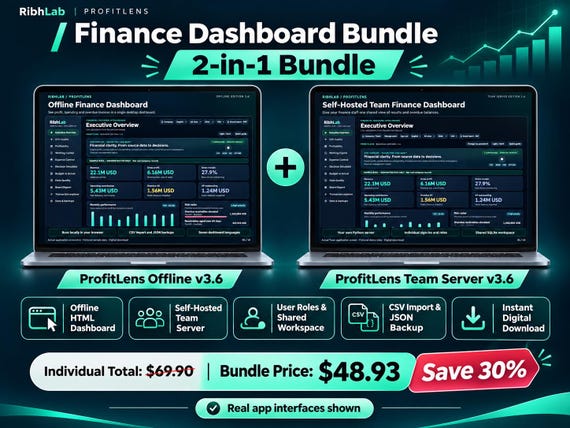
How it works, step by step
What you actually receive
The bundle contains two separate software editions: ProfitLens Offline 3.6, a local HTML finance dashboard opened in a desktop browser, and ProfitLens Team 3.6, a self-hosted Python/SQLite application with individual sign-ins and shared reporting. The files are packaged separately with a guide describing the differences.
This is not a combined super-app or one shared cloud account. It is not an Excel template or recurring hosted service. Buy the bundle if you may genuinely use both environments; otherwise the single-edition downloads are more straightforward.
When the combination can help
One analyst may prefer a private local dashboard for reviewing prepared CSV extracts, while a small finance team may need a shared workspace with controlled user roles and a central database. The bundle gives access to both alternatives.
They remain independent. You must plan and conduct any migration, export or re-import yourself; do not assume that changing a value in one edition changes the other.
Plan your installation
For the Offline edition, extract the ZIP and open the local HTML dashboard in the supported desktop browser. For Team, prepare Python 3.11 or newer, install dependencies and launch the provided server according to its guide. If remote access is required, you are responsible for securing it.
Test both versions with fictional data before importing any production records. Validate chart totals, aging buckets and report periods against the source exports. Keep independent backups of both environments.
Choosing the right listing
Single user, no server administration: start with Offline. Several authorized staff and shared access: choose Team. Need both for separate use cases: choose the bundle, while budgeting for any hosting work that Team needs.
For accurate current pricing and license terms, use the Etsy listing itself; this independent explanation intentionally does not hard-code a changing offer price.
Frequently asked questions
Are the editions synchronized?
No. The Offline and Team editions are two different tools with no automatic cross-edition data syncing.
Can I use both without a subscription?
The digital package is a download, not a hosted subscription. Self-hosting the Team edition may still involve your own operating or hosting costs.
What if I only need one?
There are separate Etsy listings for the Offline and Team editions. Compare requirements before buying the combined download.
Published 8 November 2026 · RibhLabDigital · Illustrative information, not financial advice. Validate your source data independently.