Self-Hosted Finance Dashboard for Teams
A shared reporting system adds something an offline, single-user file cannot provide: one controlled workspace where authorized team members can sign in and review the same financial records.
Python 3.11+SQLite databaseRole-based access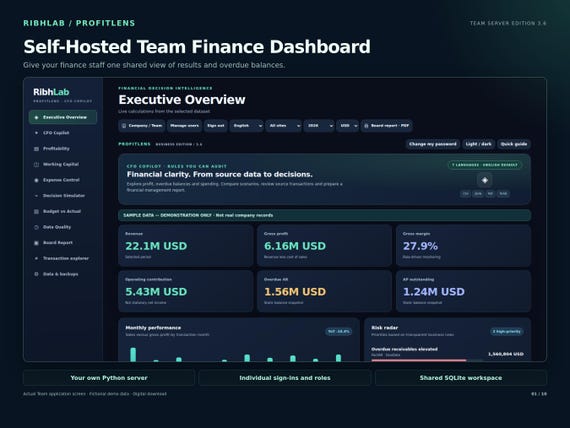
How it works, step by step
What the Team edition includes
ProfitLens Team 3.6 is a self-hosted Python application with a browser dashboard and an SQLite database. Staff use individual accounts and one of four roles: Admin, Manager, Analyst or Viewer. The administrator manages accounts and backups; authorized operators handle shared imports.
It is a digital software package, not a hosted subscription. You are responsible for your own machine or server, installation, maintenance, backups, security, and account administration.
A practical deployment checklist
Prepare a compatible machine with Python 3.11 or newer and a current desktop browser. Extract the delivered ZIP, read the setup guide and use the Windows setup and server-launch scripts if applicable. The package includes example CSV templates and fictional demonstrations for first-run testing.
For local evaluation, a loopback address is sufficient. For remote colleagues, establish HTTPS, user access controls, firewall rules, update practices and backups before exposing the server. Do not make a local development server publicly reachable without hardening it.
How finance teams can use it
A finance controller can review revenue, margin, receivable and payable aging, operating costs and budget variances. Authorized staff can import supported CSV files, examine source transactions, and export views for board reporting. Role-based access separates who can administer, import or only inspect data.
Start with a controlled import of a few fictitious rows. Define a cut-off date, period mapping, account definitions and reconciliation procedure before migrating real information. Sharing a database is helpful only if data quality and operational ownership are clear.
Constraints you should understand
The Team edition is not an ERP, banking integration or accounting compliance engine. It does not automatically sync with ProfitLens Offline, and it does not come with managed cloud hosting. It requires more maintenance than the Offline edition in exchange for a shared workspace.
If you only need personal analysis and cannot host Python, the Offline edition is simpler. If you need both a single-user tool and a separately managed shared workspace, compare the bundle.
Frequently asked questions
Is hosting included?
No. You provide and manage the server or computer on which the Python application runs.
Does it contain an Excel file?
The product is a Python server and browser dashboard, with supported CSV templates, guides and fictional demo reports; it is not an Excel workbook.
Does it sync with the Offline edition?
No automatic synchronization between the editions is included.
Published 8 November 2026 · RibhLabDigital · Illustrative information, not financial advice. Validate your source data independently.