Offline HTML Finance Dashboard for Small Businesses
If your business financial data is scattered across spreadsheets and CSV exports, an offline dashboard can help you read the numbers in one consistent place without maintaining a web server.
No server requiredDesktop browserCSV imports + JSON backup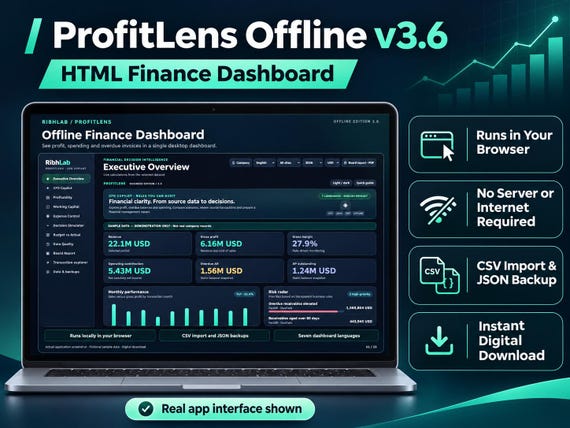
How it works, step by step
What this edition actually is
ProfitLens Offline 3.6 is a downloadable HTML dashboard designed to run locally from an extracted file in a current desktop browser. It is not an Excel workbook, SaaS subscription, bank feed, or accounting ledger. The buyer receives a packaged application and instructions rather than a hosted login.
The core use case is reviewing imported financial information: revenue, gross profit, operating costs, customer and supplier exposure, budget deviations and management KPIs. Results depend on the correctness of the records you import.
A realistic first session
Extract the download ZIP into one folder. Follow the bundled START HERE guide, open the dashboard in Chrome or Edge, and explore the fictional example records before using your own financial data. Keep the original templates untouched until you know the required CSV column formats.
Prepare sample CSV data with a few transactions, review the import preview carefully, and reconcile totals against your accounting exports. If you detect duplicated invoices, missing amounts or incorrect dates, correct the source instead of treating the dashboard as a replacement for your accounting system.
Reporting and data control
Review margins and expenses by period; see receivable and payable aging; compare a monthly budget with recorded results; explore rule-based alerts and illustrative scenarios; and export selected rows for further checking.
Data can be kept locally in the browser as supported by the application, with portable JSON backup/restore. Backups should be copied to a safe location. A local browser dashboard does not create centralized team access or automatic synchronization across computers.
When to choose it — and when not to
Choose the Offline edition if one finance professional or owner needs a local financial view on a desktop and can prepare supported CSV exports. It is particularly suitable for testing reporting conventions before introducing a shared system.
Do not choose it if several employees need simultaneous controlled access to one database, if you expect native Excel formulas, if you require automatic bank connections, or if you cannot reconcile input data. The Team edition is a different, separately hosted product.
Frequently asked questions
Does it need internet after installation?
The HTML dashboard is designed for local desktop browser use after extracting the download. Confirm any one-time setup and browser-specific behavior in the included guide.
Is it an Excel spreadsheet?
No. It is a downloadable HTML application that uses browser controls and supported CSV imports.
Can multiple staff sign in?
No shared user-account server is included in this edition. For controlled team access, compare the self-hosted Team edition.
Published 8 November 2026 · RibhLabDigital · Illustrative information, not financial advice. Validate your source data independently.